
How auto steer works, from the seat
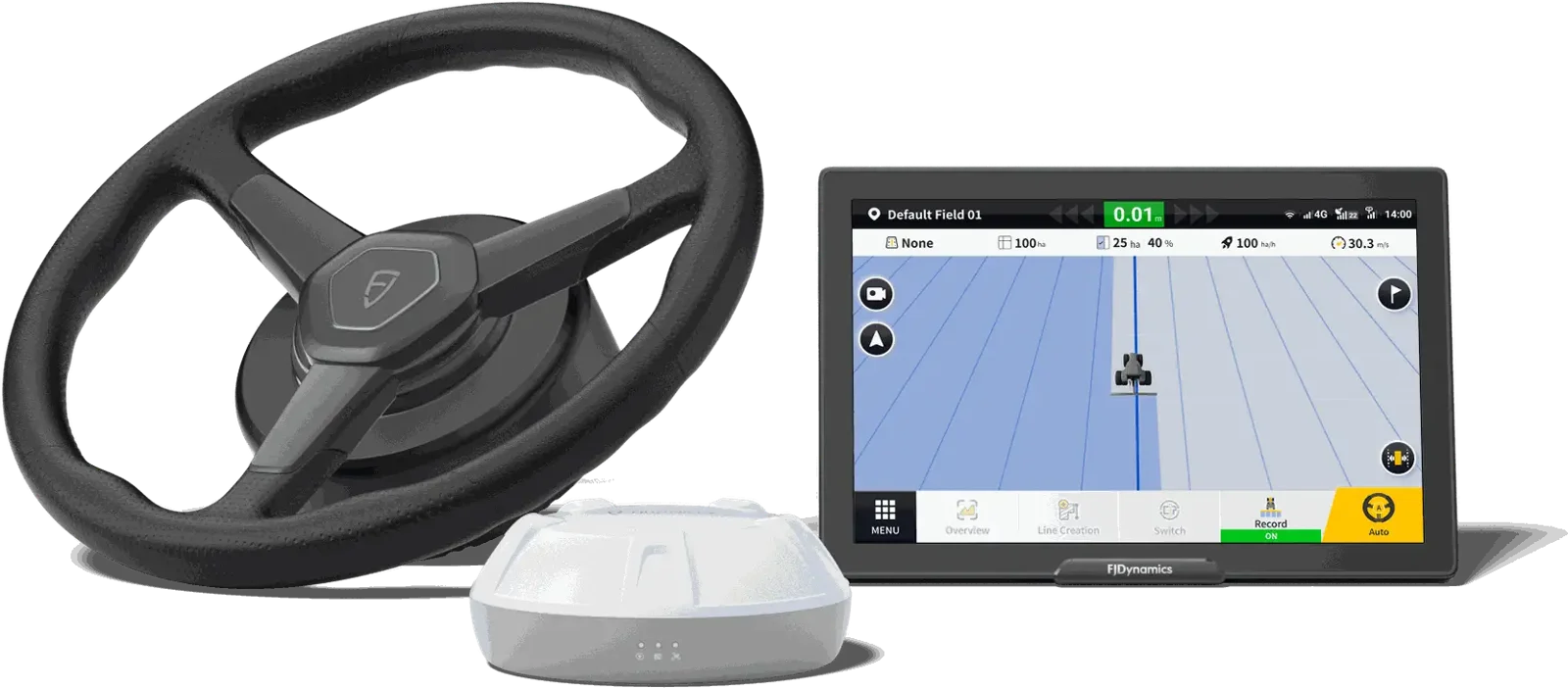
Auto steer is a receiver on the roof that knows where the tractor is to about an inch, a motor or a valve that turns the wheels, and a screen that holds the tractor on a line you picked. You drive to the field, set the line, drop the implement and press one button. From there the tractor steers itself down the pass and you run the implement. Here is what each piece does, what it will not do, and how to tell which kit your tractor takes.
Ask which kit fits your tractor Call or Text (580) 394-0089The three parts
1. The receiver. A dome on the roof listens to GPS and the other satellite systems and works out where the tractor is many times a second. On its own, satellite position is only good to a few feet. What makes it farm-accurate is a correction signal. WAAS, the free one, gets you to a few inches but drifts through the day. RTK, from a base station or the GEODNET network over cellular, gets you to about an inch and puts you on the same inch next year. Every FJD receiver runs all of them; which one you use is a menu setting. The guide on RTK vs WAAS covers that choice.
2. Something to turn the wheels. There are two ways, and your tractor decides which.
- A steering motor replaces your steering wheel with a motor that has its own wheel on it. It bolts to the column, plugs into power, and turns the wheel exactly the way your hands would. Nothing in the hydraulics is touched. This is the AT2 family, and it is what goes on most tractors we sell into, including ones built decades before GPS.
- A steering valve is for tractors that already have one. If the tractor came guidance-ready from the factory with a CAN connection, the AS2 plugs into it and the steering wheel stays stock. If it has a hydraulic autosteer valve but no CAN connection, or you simply prefer a valve over a motor, the AH2 drives the valve directly. There is no accuracy difference between motor and valve; it comes down to what the tractor has.
Most tractors also get a wheel angle sensor on the front axle. It tells the controller where the wheels are actually pointed, so the system can correct before the tractor drifts rather than after. Some machines, swathers and most combines, run without one.
3. The display. The screen in the cab is where you set an A-B line or a curve, see the tractor on it, watch the coverage paint behind you, and save the field so the lines are there next year. The displays differ by size: 10-inch on the AT2 Lite and AT2, 12.1-inch on the AT2 Max, 16-inch on the AT2 Ultra. The AT2, Max and Ultra also talk ISOBUS, which is how one screen can run section control on a sprayer or a rate controller on a planter. The Lite does not.
What a pass looks like
- Drive the first pass by hand, or just drive to the headland and pick a heading. Press A at the start and B at the end. That line, repeated every implement width across the field, is now the plan.
- Line up roughly on the next pass and press engage. The system pulls the tractor onto the line and holds it. On RTK it holds within about an inch, at planting speed or at sprayer speed.
- At the end you turn around yourself. The screen shows the next pass. Line up roughly, engage, and it pulls you on. AutoTurn, the headland U-turn option on the display, can make the turn for you once it is set up for your implement; most farmers still turn by hand and let the system take the next line.
- The coverage map paints as you go, so you can see a skip before you leave the field. On ISOBUS kits the sections shut off themselves over ground that is already painted.
What you still do
Auto steer steers. It does not see. You still watch the implement, the ends, the terraces, the pivot tracks and the neighbor's fence. You still turn at the headland unless you have set up AutoTurn. You still set the depth, the rate and the speed. What changes is that your hands are off the wheel and your eyes are on the work instead of the marker.
You take over any time. Hit the button on the wheel, the foot switch or the screen and it drops out, and there is an option to have it disengage the moment you turn the wheel by hand.
Rate and section control
Steering is one job; putting down the right amount is another. The FJD system sends GPS position and ground speed to the planter monitor or rate controller you already have, so it can do its job without a radar or a separate receiver. Or, on the AT2, AT2 Max and AT2 Ultra, we offer rate and section controllers that run on the same display over ISOBUS, so the sprayer sections and the planter rate are on the screen next to the guidance line.
Which kit for which tractor
| Your tractor | How it steers | FJD kit |
|---|---|---|
| Any tractor, any age, no factory autosteer | Motor on the steering column | AT2 Lite, AT2, AT2 Max, AT2 Ultra |
| Factory steer-ready with a CAN connection | Factory valve, plugged in | AS2 Steer Ready |
| Has a hydraulic autosteer valve, no CAN; or you prefer a valve | Valve, controlled directly | AH2 / AH2 Max |
| Combines, sprayers, swathers, articulated 4WDs | Same kits, machine-specific setup | Combines, sprayers, swathers, 4WDs |
Not sure which row you are? Read Is my tractor steer-ready? or send us the model and serial number and we will tell you.
- Tractor make, model and year
- A photo of the steering column and the cab roof
- What you pull with it and how wide
- Whether you have RTK now, and from whom
Common questions
Does auto steer work on an old tractor with no electronics?
Yes. The motor kit needs 12 volts and a place to bolt to the steering column. It does not need a CAN bus, a factory valve or dealer software. Most of the tractors we put kits on are not steer-ready and never will be, and they hold the same one-inch line.
Do I have to run RTK?
No. The receiver runs WAAS out of the box and PPP as a middle option. RTK is the one that holds the same inch pass after pass and year after year, which is what makes strip-till, planting on last year's rows and spraying between rows work. If all you do is tillage, baling and broadcast spraying, WAAS may be enough.
Will it turn at the end of the field for me?
It can. AutoTurn is an option on the display, set up for your implement and turning radius. Most of our customers still turn by hand and let the system pick up the next pass. Either way, the ends are where you pay attention.
What does the wheel angle sensor do, and does every tractor need one?
It tells the controller the actual angle of the front wheels so it can steer ahead of a drift instead of chasing it. Most tractors get one. Swathers and most combines run a setting called no angle sensor, and some tractors can too, with a little less precision.
How long does the install take?
An afternoon on most tractors with the motor kit: column bracket, motor, receiver on the roof, display in the cab, angle sensor on the axle, power. Steer-ready kits are quicker because there is no motor or sensor. Then a short calibration drive in an open spot.
Can I move it to another tractor?
Yes. The motor, receiver and display move; you may need a different column bracket and spline adapter for the other tractor. Farmers do this between a planting tractor and a sprayer every season.
More on auto steer
All buyer guides · Autosteer for Tractors · Is my tractor steer-ready? · Older tractors · Articulated 4WDs · Combines · Sprayers · Swathers · RTK vs WAAS · What RTK costs to run · FJD AT2 vs Wheelman · FJD AT2 · AT2 Max · AS2 steer-ready · AH2 hydraulic · GEODNET RTK · John Deere · Case IH · New Holland · Kubota · Massey Ferguson · Reviews
Published 10/16/2026 by Deep Sand Tech. Written from our own installs and support calls on farms across the US, not from a brochure.